Why you should delete facebook immediately

It’s been reported by both Insider and Recorded Future, that a user in a low level hacking forum on the Dark Web has published the account details and phone numbers of around 533 million Facebook users. 11 million of those are from the UK.

The leaked data that has been published is made up of a wealth of personal data. The data includes information that users have posted on their profiles. This includes email addresses, phone numbers, profile names, employment information, gender details and Facebook ID’s.

Although this information from the leak is over 2 years old, Facebook confirmed that they were made aware back in 2019 and released a patch for the leak, now that the data is out in the public domain it could be very very bad for you as a Facebook user.

you have to assume your details have been compromised

The type of data which has been leaked is seen as a gold mine for cyber criminals of all levels. The information could be used for hacking attempts or social engineering attacks.

One of the most prevalent cyber attacks in the last year has been that of social engineering. Social engineering in it’s simplest form is the use of deception and manipulation in order to gain confidential information, it’s widely known as ‘hacking humans‘. With this type of data already out in the wild it makes the criminals jobs so much easier and they can use this data to impersonate you and commit all sorts of crimes.

But this data is from 2019, why should i care?

Exactly how many times have you changed your phone number or email address over the last 2 years? Chances are you’ve probably used the same details for facebook for many years… I know I have! So you have to assume your details have been compromised. Now that criminals have this data, you may see a large rise in reports of phishing attempts and fraudulent claims. Your emails and texts may become innundated with phishing and smishing attempts in order to further exploit you.

but why should I delete facebook?

This isn’t the first time Facebook has been involved in a data leak and I can promise you it won’t be the last. Unfortunately there isn’t much you can do now that the data is out in the open but what you can do is:

  1. Be vigilant to phishing or fraud attempts with your details.
  2. Spread the word to your friends and family, say to them “Hey, have you heard about the Facebook data leak, keep an eye out for any suspicious texts, emails or calls, it could be a hacking attempt!

What can I do if I don’t want to delete Facebook?

  1. Enable MFA. Multi factor authentication.
  2. Change your email associated with Facebook.
  3. Update your password recovery details.
  4. Tighten up your privacy settings.

You are never going to be 100% safe and secure when using the internet but the more you can reduce your digital footprint, the better.

Final Thoughts

Cyber security isn’t just geeks in hoodies sat in dark rooms. By creating a culture of talking about cyber security issues with our friends and families we can increase awareness and lower potential risk of being victim to cyber crime. I can’t speak for the whole of my generation but I can say this, we spend upwards of 6-7 hours a day, phone glued in hand, switching between social media accounts without really ever thinking of the security implications behind them. We live in a generation where our digital identity is paramount to feeling accepted but it’s extremely easy for these accounts to be compromised. We have power in sharing and reposting tweets and instagram stories so if you do see something in the news regarding a cyber attack, share it, spread the word!

M

For further information regarding the data leak, see links below:

https://www.businessinsider.com/stolen-data-of-533-million-facebook-users-leaked-online-2021-4?r=US&IR=T

https://therecord.media/phone-numbers-for-533-million-facebook-users-leaked-on-hacking-forum/?utm_medium=email&_hsmi=119498507&_hsenc=p2ANqtz-_YoeuD-m-83Jjvy00xZTZM6fDX1twQpJ8_lhSodhFt8CjWFxHHcSrtwF3F0bhoncLEhbj9qH7VIy-LELYANnapuVqUZmgXZUGvuvVrKFzTxfWpQrk&utm_content=119498507&utm_source=hs_email

SEXTORTION EMAIL SCAM: Recorded masturbation and bitcoin blackmail

Threatening emails, containing allegations of your recorded self pleasure sessions, seem to be dropping into our email inboxes more and more frequently. In today’s post i’ll show you an example of one of these emails so you know what to look for if one does happen to make its way into your junk and what to do if you’ve already fallen victim to this popular scam.

Sextortion

Sextortion email scams are just another branch on the phishing tree. Criminals will try to blackmail you in to paying a large amount of bitcoin in order for them to not release videos they say they have recorded of you during your most intimate moments alone via your webcam. The criminals make this seem more legit by filling the email with technical jargon and even your old passwords which may have been leaked in a past security breach! (I’ll show you how to check if your email or password has been compromised at the bottom of this blog post). Unfortunately due to lack of awareness of this scam and the threatening language used, many of us can be intimidated and tricked into believing this is real. Reports have shown that sextortion scams have resulted in more than 500,000 cases worldwide and even suicide (Avast Blog, 2020). Below are some screenshots of a sextortion email that has been circulating the last couple of weeks in the UK:

What do i do if i’m a victim?

Advice taken from the National Cyber Security Centre’s website.

Pictured below is the official advice poster for sextortion scam victims, provided by the National Cyber Security Centre’s website.

How to check if your email or password has been compromised

Head across to this incredible site which will tell you if your email or password have been in a data breach.

Email: https://haveibeenpwned.com/

Password: https://haveibeenpwned.com/Passwords

Further information

AVAST blog on sextortion: https://blog.avast.com/sextortion-email-scams-avast

Smashing Security Podcast featuring Garry Kasparov. (Listen from 22:12-28:43): https://www.smashingsecurity.com/216

Final thoughts

For many of us, having our nudes leaked or videos of us pleasuring ourselves circulate around the internet, with the chance of our family, friends or employers seeing is horrifying and could have a catastrophic affect on our mental health. I’m sure if I was to receive an email like this a year ago I would be in a state of panic and unsure what action to take. Although we live in a time now when many of our friends are making money via onlyfans or justforfans, no one wants to have leaked images of yourself online without your consent. Luckily most of the attackers who are sending sextortion scam emails are just bluffing and have no access to your webcam or files, however it’s always better to be safe than sorry. I hope this post has highlighted some information which you can now be on the look out for when that strange email drops into your junk mail and hopefully before you make the rash decision of paying some random thousands of pounds in bitcoin!

M.

aliens in tesco carpark?

It only seems fitting that in the same week I start working night shifts at Tesco, 50 miles away a branch of the popular superstore is attacked by a potential cyber attack. In one of my favourite news stories of the week, the BBC reported on Saturday that a Tesco in Royston, Hertfordshire left shoppers in a state of mystery as 100s of people were locked out of their cars when their key fobs stopped working. One comment from a woman on facebook described the incident by saying ‘I thought it was some kind of alien phenomena‘.

Alas alien phenomena it was not. As the world becomes more advanced in the use of technology, our cars are becoming smarter and smarter and there’s a high chance that if you’ve bought a new car recently you will have the use of keyless entry or an electric fob. Although this may make our lives that little bit easier, it also adds another target for criminals to exploit. Hertfordshire police have commented and said the cause for the locked cars is not known but “was not being treated as malicious intent”, there’s a high possibility radio jamming devices blocked the signals which are used in remote locking.

I thought it was some kind of alien phenomena.”

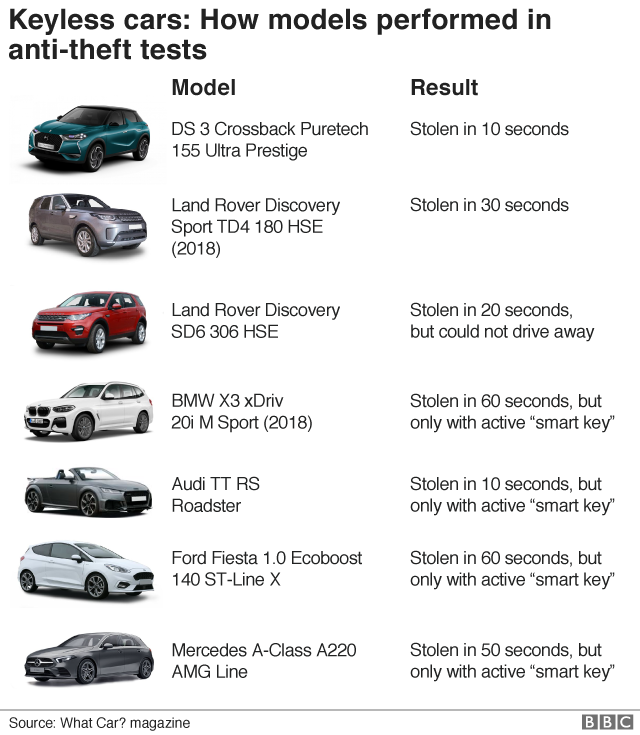
Key jammers (transmitters) are extremely easy to buy online and can be used to interrupt signals from key fobs leaving your cars vulnerable to attacks. Low powered key jammers have enough range (around 75m) and power to target an area similar to a whole car park. Back in 2019 whatcar did a test on 7 different models to see how long it took to access the cars remotely and drive them away.

How cars performed in anti-theft test

Final Thoughts

In a more detailed post i’ll get more technical and give you some more information regarding the different ways your cars can be hacked but for now i’ll leave you with the link to the BBC article for further reading: https://www.bbc.co.uk/news/uk-england-beds-bucks-herts-56221408

M.

Phishing, vishing + smishing

In a recent post, I highlighted the threat of a recent phone scam involving the HMRC, in this blog post I’ll give you more of a breakdown of phishing, vishing and smishing and give you some examples of how cyber criminals will try to fool you in attempts to gain your details.

phishing

Similar to the art of fishing which is defined as ‘the activity of catching fish, either for food or sport’, phishing is the cyber equivalent where criminals actively try to ‘catch’ your personal information by using deceptive social engineering techniques in the hopes of gaining access to your accounts both personal and financial.

Phishing is carried out via email to obtain sensitive information or data. This is done by spoofing (faking) the email to look like it’s come from a trusted source but with subtle differences. These emails are designed in a way to make you click a malicious link which would take you to a fake website created by the criminals in the hopes that you enter personal information or allow the criminals to install malware (malicious software which could freeze your system or lock your files as part of a ransomware attack).

How does phishing work?

The two main methods criminals use in phishing attacks are links to malicious websites and including malicious attachments. Usually, malicious links will take you to cloned websites of ones you are very familiar with and the malicious attachments usually have ‘click bait’ names such as ‘INVOICE’ which then install malware on your device when opened.

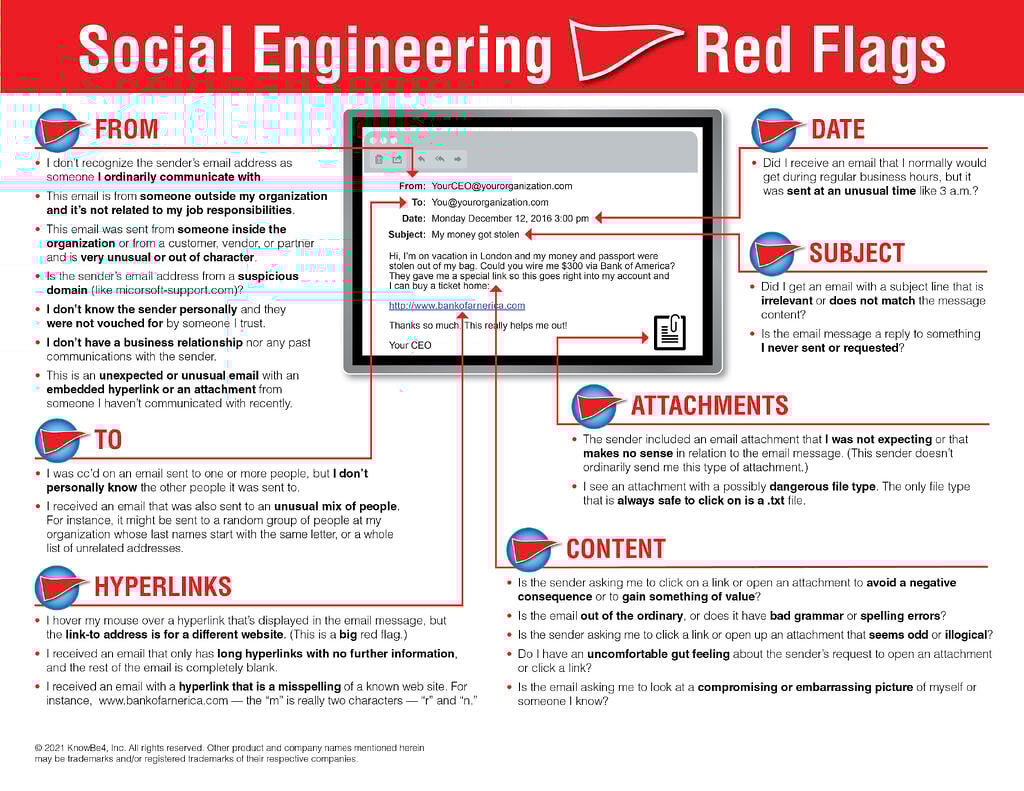
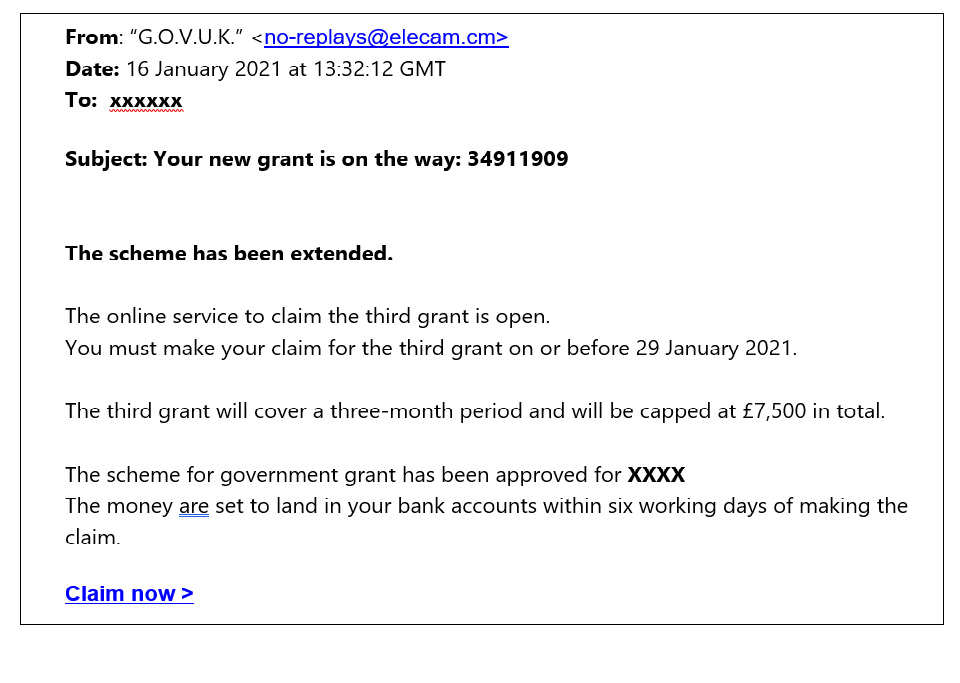
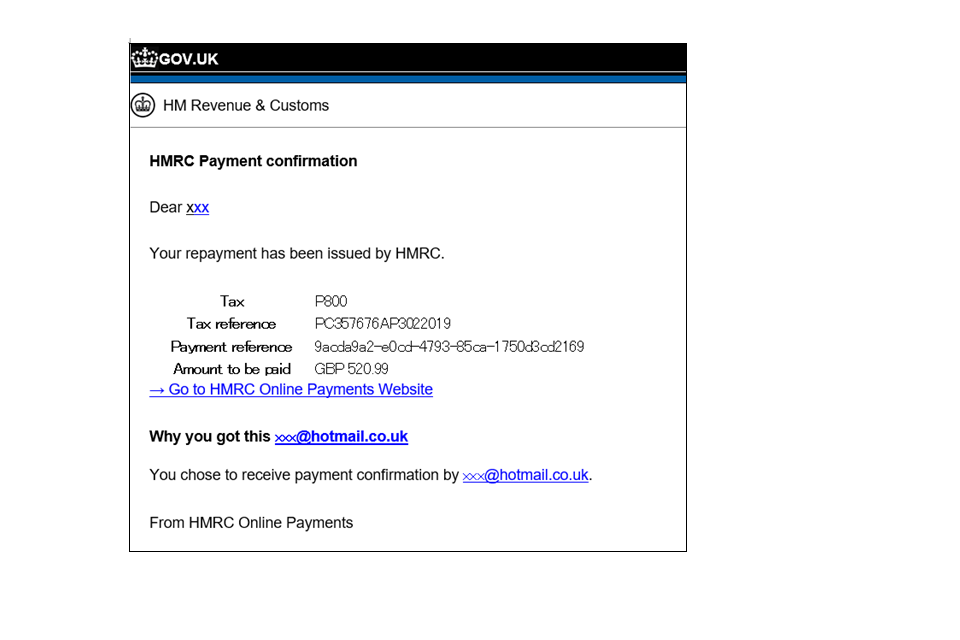
Below is a picture I have taken from the brilliant http://phishing.org which highlights some red flags if you think you have received a phishing email. I have also attached a couple of examples so you know what to look out for.

22 Social Engineering Red Flags

COVID19 GRANT PHISHING EMAIL

scam email with link to phishing website

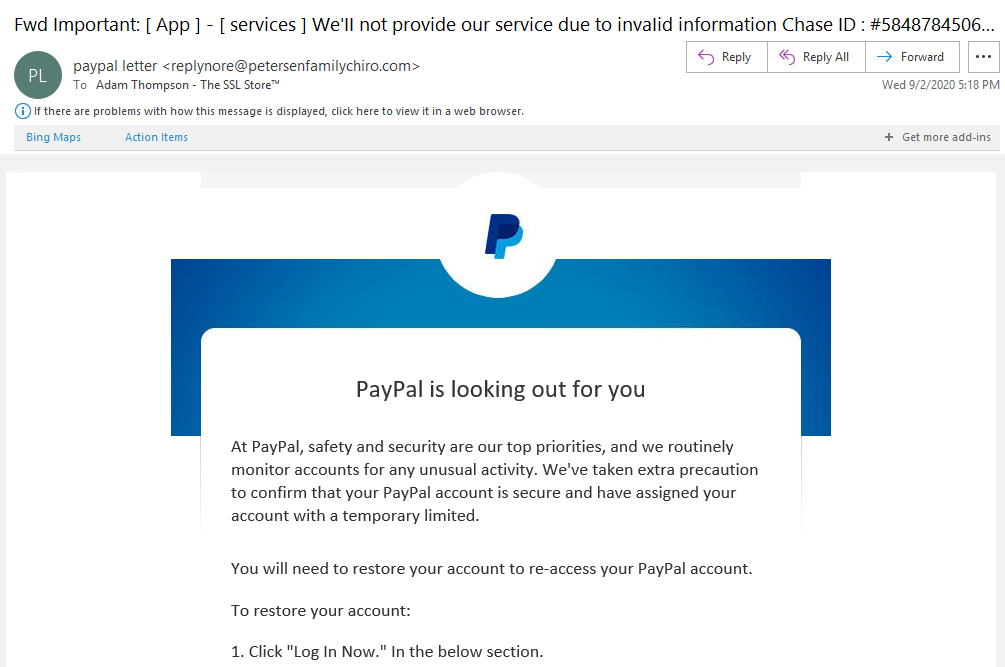
paypal phishing email

PayPal phishing email example screenshot

4 things to look out for

  1. Legitimate companies will usually address you by name.
  2. Legitimate companies will not ask for your sensitive personal information over email.
  3. Phishing emails are riddled with spelling mistakes.
  4. Hover your mouse over any link to see the destination of the URL.

VISHING + SMISHING

Vishing and smishing have the exact same concept of phishing but are just two specific ways in which criminals will try to steal your information.

Vishing is the fraudulent attack of making phone calls or leaving voice messages in the attempt to get victims to reveal personal information such as bank details and credit card numbers. During a vishing call, criminals will use social engineering techniques to get you to trust them and believe they are who they say they are. They will often spoof their phone number, so it looks like it’s coming from the official business it’s pretending to be. The most common vishing scam is vishing banking. These scams involve a call from someone who says they’re from your bank and that there is problem with your account or with a payment, they will then ask you to transfer funds to a different account to fix the problem. One of the most recent vishing scams is the HMRC tax fraud scam which I wrote about in my last post. 

Smishing is the fraudulent attack that uses misleading text messages to trick victims into giving your private information via a text. Smishing is the same scam as phishing and vishing but the criminals just use text messages in the hopes that you’ll trust this form of communication more. These text messages again may include links which will take you to cloned webpages asking you to input usernames, passwords, and credit card details. 

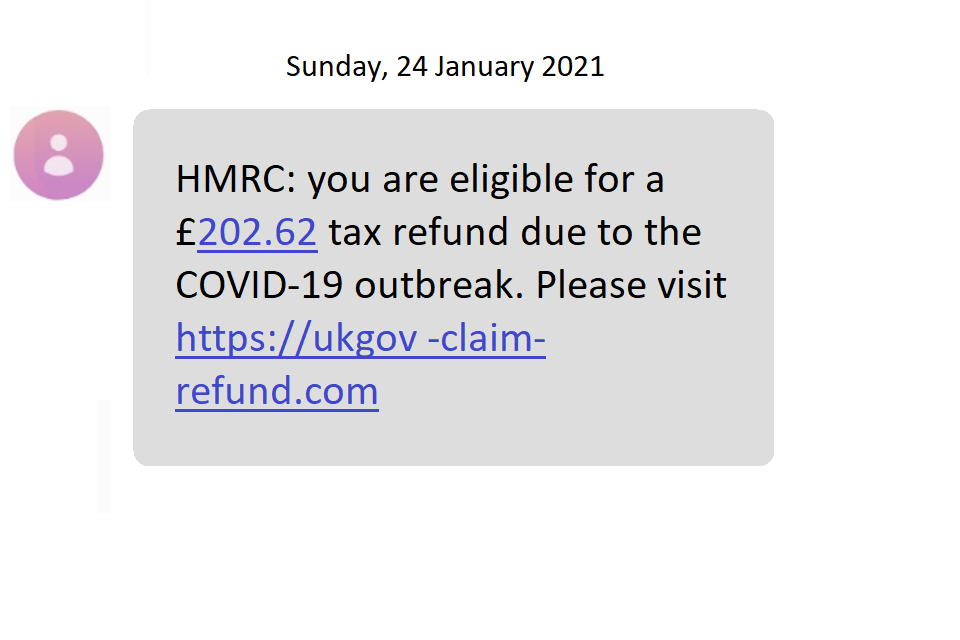
Below are a few examples of smishing attempts.

smishing-example-amazon
smishing-example-apple

Final thoughts

Since the start of the coronavirus pandemic more and more of us have been victims of phishing attacks. This is due to criminals taking advantage of our new work from home lifestyle, we are more susceptible to these scams as we are making more calls than before, reading more emails, and generally communicating digitally a lot more than if we were still working in the office. Unfortunately, pandemic or not, criminals will take advantage of their victims in any way they can to benefit financially. Hopefully, this blog post has highlighted some of the things to look out for and will hopefully make you think twice before you click on that email from Amazon with your £1000 gift card (insert side eye emoji here). There are so many incredible resources just a google click away when it comes to phishing scams, many large businesses are aware of them and have their teams dedicated to dealing with phishing scams. 

Also a big thanks to Alex @ItsArtBabes for the awesome animation at the top of this blog.

New blog posts every Wednesday and Sunday.

M.

HMRC VISHING SCAM AND HOW TO AVOID!

It’s 08:19am on a Saturday morning in early Febuary and I wake up to three missed calls and three voicemails from a number I don’t recognise. Now I never listen to my voicemail messages but something told me that this morning I should check them out, clearly who ever called me was desperate for my attention so the least I can do is listen to what they have to say right?

So I access my voicemails and listen to them each in turn, all with the exact same pre recorded message:

“This is the HMRC, a tax fraud case has been filed against your name and unless you pay the amount requested an arrest warrant will be made against you, please press 1 to speak to an advisor”

Now i’m barely awake at this point but even I know something doesn’t feel right, I reverse search the number and realise this is the beginning to a vishing scam that is currently sweeping the UK but before we go any further there’s a few things you need to understand…

What is a vishing scam?

A vishing scam is a type of phishing attack where criminals will call you posing as a bank staff member or other financial service employees and try to get you to share your personal information over the phone, they will use social engineering tactics to persuade you to reveal personal details which will allow them to access your accounts.

But what is phishing? In a nutshell, phishing is a cyber attack that criminals use by using disguised emails as weapons to gain your personal credentials by tricking you into believing the email is from a legitimate source. The criminals spoof (fake) their email address so it looks like its coming from a trusted source, set up fake websites to look like the originals and use slightly modified URLs to direct you to a site created by the criminals in the hope you will provide them with your personal or financial information.

“Someone mentioned smishing is that the same thing?” – Absoloutely! Smishing is the equivalent to phishing and vishing but the criminals use text messages in order to try and steal your information.

THE hmrc scam

So what exactly happens in this scam?

Well it starts pretty much the same for everyone just how I described above. You’ll get a call from a mobile number that you don’t recognise and even sometimes the criminals will spoof their number to make it look like the official HMRC number. You will then have the pleasure of listening to that lovely pre-recorded message explaining that you will shortly be arrested unless you pay the money you owe and to press 1 to speak to an advisor. Pressing 1 transfers you to an ‘HMRC representative” aka the scammer. Now vishing scams are no simple feat and there is usually a highly complex criminal web with multiple people involved who may seem highly convincing. The representative will then proceed to tell you the accusations against your name and even provide pdf documents as if to seem legit, they will then ask you for more details and to start transferring money now as you’re on a timed call and the money has to be paid ASAP. (Some victims have said that the criminals told them the police were on standby 30minutes away and if they didnt pay within that time frame the police would arrive at their address). They’ll ask you to start transferring money in small amounts to different bank accounts as this makes it a lot harder for your bank to track the routes that the money takes.

Now you’re probably sat there thinking, “yeah i’d definitely know this was a scam and i’d hang up”, well lucky you but these calls can be highly intimidating and when you’re under pressure you can make extremely rash decisisons.

As the call progresses the questions get more personal in the hope you’ll reveal more information that is useful to the criminals until they’ve taken large amounts of your money and left you broken both financially and mentally. It’s intense and they will target anyone. Young or old, global pandemic or not.

I’ve been victim to one of these calls what should i do?

Well first of all you need to know that:

HMRC will never send an email, text message (or message in an app such as WhatsApp) or give you a phone call which:

  • tells you about a tax rebate or penalty
  • asks you for your personal or payment information

Next you need to report the call to the official HMRC phishing team

Final thoughts

hang up like it’s 2004 and you have a flip phone

Now I come from a performing background where I was registered as self employed and very rarely had anything to do with the HMRC unless it was to fill out my self assessment form. The rest of the year I never thought about taxes or any money I needed to pay them. I have many friends in the same position as me and to be honest the knowledge of paying taxes isn’t something i’ve ever been taught. Being a performer you often live from job to job and money is tight, so to receive a call like this without my cybersecurity knowledge, I would be scared. Taxes aren’t a thing that we ever learnt at school and more likely than not, if you get a call from the government saying you owe them money you probably will think that you do. Unfortunately the criminals don’t care. They will target anyone and right now there are a lot of vulnerable people that will fall for this scam. So I ask you all to share this post and talk to your friends about this, spread the word and make sure when you answer that unknown number and that pre-recorded message starts to play you hang up like it’s 2004 and you have a flip phone.

M.

Links for HMRC phishing page & ActionFraud:

https://www.gov.uk/report-suspicious-emails-websites-phishing/report-hmrc-phishing-emails-texts-and-phone-call-scams

https://www.actionfraud.police.uk/

how to get rid of ‘those’ message requests on instagram!

If you’re like the rest of us then you’ve been receiving countless group message requests on instagram and you’re probably sick of it! I know I am! Well today i’m going to show you a simple way of stopping them but first what exactly are they?

Sick of these messages? keep reading.

I’m sure you’ve all heard of spam (no i’m not talking about the canned cooked pork), i’m referring to the annoying bulk messages that you keep finding in your email junk, facebook and instagram message requests folders. In cyber security, the term spam refers to the unsolicited bulk messages being sent through email, instant messaging or other digital communication tools. It’s generally used by advertisers because there are no operating costs and all they need to maintain is their mailing lists. So apart from being a nuisance why is spam bad? Spam can be used to collect sensitive information from users and has also been used to spread viruses and other dangerous malware. Spam often includes messages with links in which you click and it will take you to a spoofed website. This means the website may look how you expect but there are subtle differences for example; different logo or different web address. The criminals spoof websites in order to collect your personal information such as usernames, passwords and credit card details.

Image result for spoofed facebook
A spoofed facebook login page.

So what does this have to do with instagram message requests?

Well as most of you are aware since late 2020 our Instagram message requests have been inundated with group message requests from accounts with pictures of half naked girls with 0 followers. Clicking on these messages can not only be extremely annoying but also highly dangerous. Many of these spam messages are actually pornbots. These are suspicious accounts that send thousands of DM’s in the hope that someone will open the message, click the link and be taken to a porn website in the hopes you sign up and then the criminals can take your money. But you’re clever enough not to input your credit card details right? Some of these links work the same way click bait and advertising do so the criminals can make money just from you clicking on the link.

Below I outline the process in which you can increase your profile security and lower the risk of receiving these messages. Now you will never be 100% secure online but hopefully if you follow these steps it should help a little.

step 1- Head to the settings section of your profile.

step 2- select the privacy option.

step 3- select the messages option.

step 4- select the following options below.

Password managers

What are they? Do I need one?

  • Are you using the same password for more than one application?
  • Would I find your password in the dictionary?
  • Do you forget your passwords easily and often have to reset them?

My guess is you answered yes to at least one of the above questions, if so then you NEED a password manager!

Passwords are a vital part of our online identity, they’re the digital equivalent to a lock on a door which holds all of your personal information. This makes them a prime target for cyber criminals. There are a multitude of ways in which a hacker can crack your password so its super important you have a vault of strong passwords for each site that you use. If a criminal cracks your password they can gain access to your social media, contacts, photos, videos, emails and finances.

I’ll go into detail of how criminals can crack your password in a later blog post but all you need to know right now is if you have an easy password a criminal can crack it quicker than you can read this paragraph. Examples of easy to crack passwords include those that feature common words that you would find in a dictionary, personal information such a birthday or passwords that are shorter than 8 characters long. Using large lists of stolen passwords bought off the dark web, cyber criminals can brute force their way into your lives and then use this to scam you.

The average user has around 100 passwords.

Nordpass 2020

what can i do to protect my passwords?

Well i’m glad you asked! This is where password managers come in to play.

Password managers basically act as an online vault for you to store all your personal information including passwords, addresses and even bank details. They store your login information for all the websites you use and help you log into them automatically. In 2020 Nordpass reported that the average user has around 100 passwords. As technology advances so do the list of passwords we have to remember for each new application and website we sign up for. Password managers encrypt your password database with one ‘master password‘ meaning you only have to remember one password.

What are the benefits of using a password manager?

  • You dont have to remember 100 passwords, just remember one master password.
  • They can auto fill extremely complicated passwords for you such as ‘9y6JlBYf8PiY’ instead of using ‘password123’.
  • They save time by auto filling not only your password but can also auto-fill your personal details in online forms (especially handy when online shopping).

So which password manager should i use?

Many desktops and laptops have password managers which store your passwords locally on your device in an encrypted vault however you can’t access these if you lose the device or if that device becomes compromised.

I would suggest using a cloud based password manager.

The main beenfit of using a cloud based password manager is that you can access it from multiple devices. Many browsers such as safari, chrome and edge all come with password managers installed in them. These are a great starting point for storing passwords.

I personally would recommend the use of LASTPASS. https://www.lastpass.com/

LastPass is a free to use password manager. With an easy-to-use dashboard with unlimited storage, LastPass remembers every password and syncs across all your devices for free. LastPass secures everything you need, from passwords to digital notes, addresses to financial information.

Free features include:

  • Secure password vault
  • Access on all devices
  • One-to-one sharing
  • Save and fill passwords
  • Password generator
  • Secure notes
  • Security challenge
  • Multifactor authentication
  • LastPass Authenticator

how it works

The First post!

A quick insight of what to expect!

Well here it is… my first blog!

Why do this?

  • To give you all the most up to date cyber security news and tips
  • Because it will help you become aware of the risks we take each day just by having an online presence

Hopefully this blog will allow a wider audience the ability to learn what they need to do in order to keep safe online. I will try to post as frequently as possible and each week do a round up of my favourite news stories.

M.

Design a site like this with WordPress.com
Get started